

Streak tracking
Visual streak calendars and gentle nudges that make journaling feel like a game — not a chore. Users who track streaks, journal 4× longer.
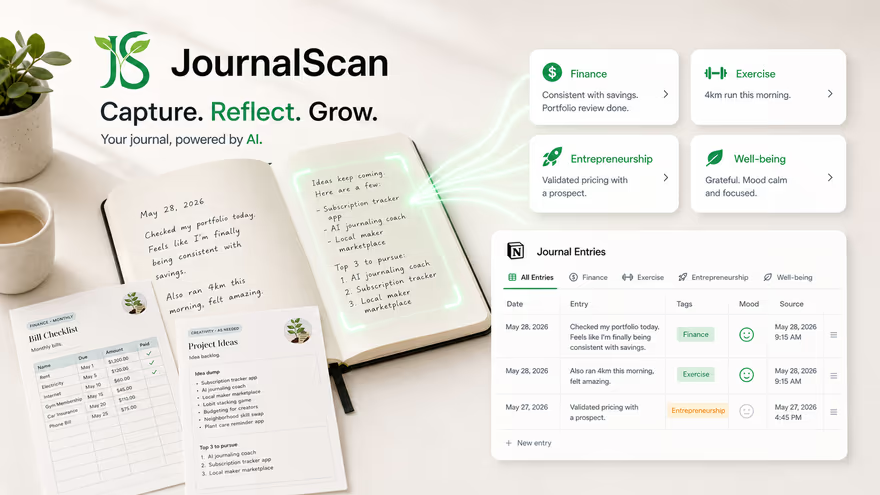
JournalScan uses AI to scan, tag, and sync your handwritten journal entries into Notion — so you can finally review, search, and grow from what you write.
Already have an account? Sign in
People have done journalling at some point — millions of pages written and never stored, never reviewed
Source: Journal Therapy research estimates
of new journalers quit within 3 weeks — mostly due to no feedback or structure
Source: Habit discontinuation research (Memorist, 2023)
more likely to achieve goals when they're written down and reviewed later
Source: Dr. Gail Matthews, Dominican University (2007)
Journalling has profound long-term benefits — but a predictable set of friction points quietly kill the habit before it ever takes root.
Journalling rewards you in the long run — but the effort feels invisible day-to-day, making it hard to begin.
Even motivated writers hit a wall — without structure or prompts, the blank page wins.
Thoughts are written but left raw — spread across notebooks and apps (or possibly lost forever).
Manually structuring scattered entries takes time and effort most people don't have or enjoy.
Without organization, patterns stay hidden. No visible progress means motivation drains.
→ back to ①
Breaking the cycle
JournalScan captures your thoughts across any medium and uses AI to organize, reflect, and surface insights — so your journal finally works for you.
Three steps between your journal and a searchable, structured Notion database — powered by AI.
Photograph or upload journal pages using your phone camera. JournalScan accepts handwritten notes, bullet journals, and typed pages alike.
Our AI-engine transcribes your handwriting with 97% accuracy. Then, it auto-tags entries by category, emotion, date, and goal — no manual sorting required.
Entries appear in your Notion workspace as structured database rows — searchable, linkable, and ready to connect with your tasks and goals.
JournalScan generates summaries and insights based on your entries, helping you reflect on your thoughts, actions and feelings.

Built for the way real journalers write — not just the ideal version of it.
Visual streak calendars and gentle nudges that make journaling feel like a game — not a chore. Users who track streaks, journal 4× longer.

JournalScan provides writing prompts based on your past entries / standard templates — helping you dig deeper and write more consistently.

Transform your journal entries into stylish phone wallpapers that keep you motivated and inspired every time you unlock your screen.
JournalScan turns passive writing into an active system for self-understanding and goal achievement.
Search years of entries in seconds. Find the time you wrote about that idea, that feeling, or that conversation — without flipping pages.
Track mood trends, recurring themes, and goal progress over weeks and months. Growth feels real when you can see it in your own words.
Streak tracking, gentle reminders, and personalised prompts reduce the friction that kills most journaling habits within weeks.
Journal entries land directly in Notion — where you already manage tasks, goals, and projects. Your reflection feeds your planning.
If you already journal — or want to — JournalScan removes every obstacle between you and the habit.
Capture lecture reflections, study logs, and personal growth notes. Build a searchable archive that spans your entire university journey.
Turn daily reflections into structured career insights. Track decisions, lessons, and goals — and connect them to your Notion workspace.
Surface mood patterns, gratitude themes, and mental health trends from your own writing. Understand yourself more deeply over time.
Mine your personal journals for story ideas, character observations, and raw material — all searchable and tagged by theme.
Preserve family memories, children's milestones, and everyday observations in a permanent, searchable digital archive.
Write goals by hand — then let JournalScan track them automatically. Review progress without retyping a word.
“I've been journaling for 6 years and had 12 notebooks I'd never re-read. JournalScan scanned all of them in a weekend. Now I actually use my journal — because I can actually find things in it.”
Connect JournalScan to your Notion workspace in under 2 minutes. Free to start — no credit card required.
Already have an account? Sign in